Ordering Takeout, Sending Messages, Scrolling Videos: Three Things, One Six-Layer Map — The First Lesson of Computer Science
A "Magic Box" or Six Layers of Division of Labor? — Why Understanding the Computer Should Start with Getting a Map
You order takeout, text a friend, and scroll through videos before bed. Three actions, one and the same system working behind all of them. Most people's first instinct when learning about computers is to look up "which CPU to pick, how much memory, whether the graphics card can handle it." Those questions aren't wrong, but they're questions asked while standing in front of individual machines, not while standing in front of the whole system. What this article gives you is the latter: a map.
The first rule of the map comes from an idea called layering. A computer is not a magic box but a division of labor stacked layer upon layer: each layer does exactly one thing, uses only the services offered by the layer directly beneath it, and hands the result up to the layer above. Anyone who has written code will immediately recognize this as the same thing as the module dependencies they're used to: a module can only call the modules it declares as dependencies, and can't reach past intermediate layers to touch someone else's internal state. Layering just scales this rule up from code organization to the entire computer. The rule is called the strict dependency rule: layer n may only use the services of layer n−1.Valente
Strict downward dependency brings two concrete benefits. First, replaceability: a layer can be swapped out entirely without disturbing the others, like switching the transport protocol from TCP to UDP. Second, reuse: the HTTP used by web pages, the SMTP used for sending email, and the DHCP that automatically assigns parameters when you go online — these three protocols do completely different jobs, yet they can all share the same transport layer, because the transport layer is a strictly defined public utility.
Layering is not a pretty slogan invented by textbooks. In 1968, Edsger Dijkstra divided an entire system into five layers in the THE operating system: multiprogramming, memory allocation, process communication, I/O management, and user programs — one of the earliest real systems in which the idea of layering was actually implemented. Here's what it looks like:

Figure caption: The five-layer stack of the THE operating system: the bottom manages the CPU and clock, the top runs user programs, and each middle layer provides abstraction services to the one above, with the levels of abstraction noted on the left. Note that the layer names in the figure (such as Segment Controller) come from a third-party teaching transcription; the original five layers in Dijkstra's paper are multiprogramming, memory allocation, process communication, I/O management, and user programs.Vectree
Pull the lens further back, and centuries of history from the abacus to the internet tell one and the same chain. In 1642 Pascal built the mechanical adding machine Pascaline; in 1890 the U.S. census used Hollerith's punch-card tabulating machine to cut the tabulation time by two years; in 1945 ENIAC used tens of thousands of vacuum tubes to compute ballistics; in 1947 the transistor was invented, in 1958 the integrated circuit appeared, and in 1971 the first microprocessor, the Intel 4004, was born — followed by personal computers, smartphones, and the device in your pocket today. Each generation exists to fill a gap the previous generation couldn't solve, which is nothing but layering projected onto the timeline.History of computing
This way of organizing has also been validated by the market. Englander and Wong's introductory textbook The Architecture of Computer Hardware, Systems Software, and Networking fits hardware, system software, and networking into a single book, organized in the order overview → data → hardware → networks → software, with only basic computer operation as a prerequisite. Layering isn't an abstract leap; it's a connecting chain that already exists in a real course.Englander & Wong
Now lay that chain out flat, and you get the six-layer map in the title of this article:
| Layer | The question it answers |
|---|---|
| Theoretical computability | What can be computed? |
| Computer architecture | How do you build a machine that can run any program? |
| Physical substrate | On what physical medium does the blueprint land? |
| Software | How do people command this machine? |
| Networking | How do machines connect once there are many of them? |
| End-to-end construction | Can the whole chain really be walked end to end? |
The reason every layer exists is that the layer above left behind a problem it couldn't solve by itself. So the chain has to start somewhere. The earliest gap was purely theoretical: before building any machine, you first have to answer what can be computed. The next chapter starts from exactly this point.
What Can Be Computed? — The Turing Machine Is a Measuring Stick, Not a Construction Blueprint
In 1936, Alan Turing asked a question more fundamental than "how do you build a computer" in his paper On Computable Numbers, with an Application to the Entscheidungsproblem: what is computable? His answer was an abstract machine with only three things: a tape divided into cells, a read-write head that can read and write, and a table of rules (a state-transition table). With each step, the machine's action is determined entirely by two things: which state it is currently in, and which cell the read-write head is pointed at. The rule table tells it what symbol to write, whether to move left, right, or stay put, and which state to switch to next.Turing 1936
In plain words: every computation any program can do can be expressed by this machine. Take a look at the machine's three parts:

Figure caption: A teaching illustration of the Turing machine's three components: a 13-cell tape and a yellow read-write head that "views" one cell at a time; the head's three movements (move left, stay, move right); and the state-transition table that decides what action to take and which state to switch to when reading a given symbol. This is a teaching illustration rather than the paper's original figure; q1 through q3 on the right are just a simplification of an example machine in the paper.
Here's a counterintuitive point: the tape and the read-write head sound like concrete mechanical devices, yet the Turing machine is a purely logical construct that was never meant to be physically built. It doesn't answer "how do you build a machine" but "what can be computed." Anything expressible on this machine is computable; anything beyond that boundary can't be computed by any machine. So the more accurate way to put it: the Turing machine is a measuring stick, not a construction blueprint. It is also the shared "theoretical ceiling" of all programs — nothing any program can do can exceed the expressive power of this tape machine.
The most stunning step in the paper is the universal machine (the universal Turing machine). Turing proved it's possible to build a machine U that takes in not ordinary data but the description of another machine M: how M works, written as symbols on the tape, and U executes them. Anyone who has written an interpreter will smile: that's exactly how an interpreter reads a program in as data and executes it statement by statement. The seed of "program as data" was planted back in 1936.
How the Turing machine actually runs step by step, and why the halting problem is unsolvable — that's covered in depth in the companion topic What Is Computation: Turing Machines and the Boundaries of Computability. All you need to take away here is one sentence: in 1936, Turing answered "what can be computed" and incidentally planted the idea that "a program itself can be data." That idea had to wait nearly a decade before it became the blueprint of a real machine. The next chapter shows how it landed.
The Measuring Stick Exists — How Do We Build the Machine? The 1945 von Neumann Blueprint
Turing gave us the measuring stick; von Neumann gave us the blueprint. This sentence appears exactly once in this whole piece, because it is the only bridge between the two layers.
The ENIAC of 1945 was a real machine, but it had a fatal clumsiness: programs weren't stored in the machine — they were configured by hand, one patch cable and switch at a time, and changing a program meant re-plugging days' worth of wiring. John von Neumann wrote an internal memorandum in 1945, First Draft of a Report on the EDVAC, proposing to put instructions and data into the same memory: the program lives in memory as data, and changing programs means changing the contents of memory. This idea was later named the stored-program concept.von Neumann 1945
To see how far the other side of the bridge is, look at Maurice Wilkes in Cambridge. After reading the First Draft, he immediately decided to attend the 1946 Moore School lectures, and after returning home he built EDSAC directly, which ran its first programs in May 1949. From "reconfiguring patch boards" to "replacing the contents of memory," programs were freed from the machine's physical wiring — and only then did the machine deserve the word "general-purpose."
What does the blueprint itself look like? The First Draft breaks the computer into several components: the central arithmetic part CA, the central control part CC, memory M, input I, output O, plus an external recording medium R. Simplified to today's terms, that's a CPU (control plus arithmetic) and memory, connected through a bus. The way the figure below is drawn has become the standard image in textbooks:

Figure caption: The standard block diagram of the von Neumann architecture as drawn today: the CPU on top contains a Control Unit and an Arithmetic/Logic Unit, with an independent Memory Unit below, and two bidirectional arrows between CPU and memory representing the shared bus. This is a modern simplification of the 1945 blueprint, not an illustration from the original First Draft.Von Neumann arch

That blueprint is itself a piece of historical record. The cover of the typescript pins the date, contract number, and institution to the page:

Figure caption: The cover of the June 30, 1945 typescript First Draft of a Report on the EDVAC: author John von Neumann, contract number W-670-ORD-4926, institution the Moore School of Electrical Engineering at the University of Pennsylvania. It was an internal memorandum, not a formally published paper, yet every general-purpose computer since has drawn its blueprint from here.First Draft cover

From "computable" to "able to run programs," the bridge is the stored-program concept. How the CPU actually fetches, decodes, and executes an instruction, and what each of those components manages — that's covered in depth in the companion topic The von Neumann Architecture: The Skeleton of a Computer. Now that we have the blueprint, the next gap appears immediately: on what physical material do we actually build the CPU and memory on paper?
What Physics Does the Blueprint Land On? — Four Generations of Media, Each Solving the Gap Left by Its Predecessor
The von Neumann blueprint specifies logic, not materials. On materials, history offers a four-generation relay: vacuum tubes, transistors, integrated circuits, microprocessors. Each generation's medium solves precisely the gap the previous generation couldn't: vacuum tubes compute fast but are too big, too hot, and short-lived; transistors are smaller, cooler, and more reliable; discrete components take up too much space once there are many, so hundreds of thousands of transistors get built into a single chip; and the entire chip still isn't enough, so the whole CPU goes onto one piece of silicon.History of computing

Put some numbers on this chain to see its weight: ENIAC used more than eighteen thousand vacuum tubes and filled an entire machine room. The transistor was invented in 1947 and replaced vacuum tubes in computer design from 1955; in September 1958 Jack Kilby demonstrated the first working integrated circuit, and in 1959 Robert Noyce made the monolithic silicon IC; in 1971 the Intel 4004 put an entire CPU on a single silicon chip, ushering in the microprocessor era. After that, density growth roughly followed the pace Moore's Law predicted for many years.
The four generations of media share one thing in common: they all distinguish using "two states" — powered/unpowered, charged/discharged. Why binary, of all bases? Because two states are the easiest to distinguish physically and the most resistant to noise. This is the physical prerequisite for the von Neumann blueprint to land. Number-base conversion and encoding, and the division of labor between memory and storage, are covered in depth in the companion topic Binary and Hardware: How Machines Think Physically; the breakthroughs of the four generations and the evolution of modern devices belong to A History of Computing: From Vacuum Tubes to Smartphones.
The trend of miniaturization becomes obvious in a single 1962 photograph:

Figure caption: A 1962 photo of parts from four early computers: from left to right the boards get smaller one by one, with electronic cabinets filling the room in the background. The photo only supports the single claim of miniaturization; the correspondence between specific boards and machine models cannot be read from the image.Wiki Commons
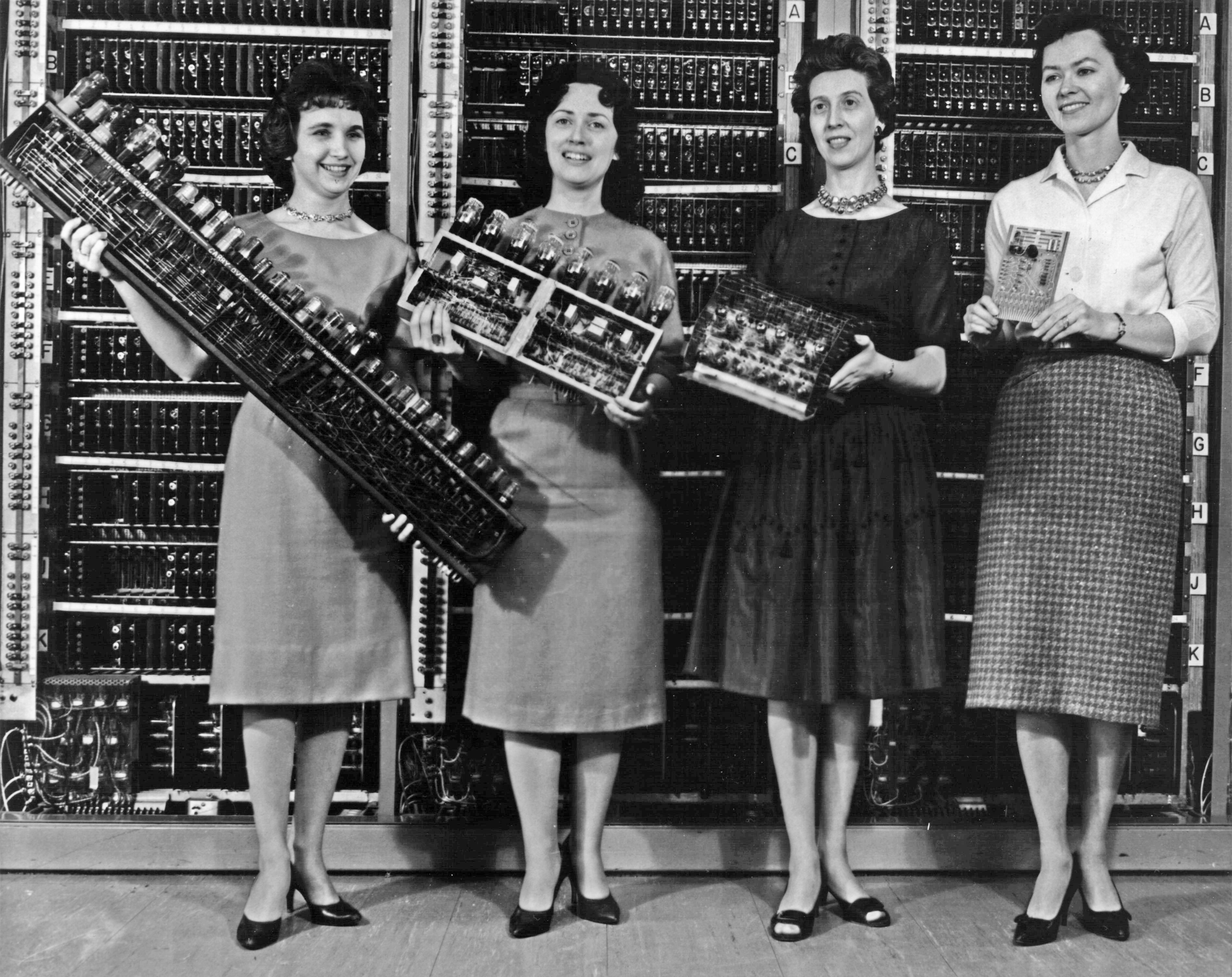
The hardware layer is where "blueprint to physics" lands. But as media grew more complex, a contradiction surfaced: the machine only recognizes 0s and 1s, and people can't very well command a machine by writing 0s and 1s. That is the reason the next layer, software, makes its entrance.
The Machine Only Understands 0 and 1 — How Do People Command It? Compilers Translate; Operating Systems Encapsulate
The software layer is built from two roles: the compiler translates, and the operating system encapsulates. Both share the same justification: sparing people from facing the hardware directly.
The machine only understands 0s, 1s, and circuit patterns, while what people can read is high-level languages. A compiler is software that translates code written in one language into another — in particular, translating a human-written high-level language into machine code. The structure of a modern compiler is a fixed three phases: the front end reads the source code, performing lexical, syntactic, and semantic analysis and producing an intermediate representation; the middle end performs optimizations on the intermediate representation that are independent of the target CPU; the back end generates machine code for a specific processor.Compiler
This split isn't pedantry; it's reuse. The diagram makes it clear:

Figure caption: Four source languages — C, C++, Ada, Java — flow into the Front end, pass through the Middle end and Back end, and point respectively at four target architectures: ARM, Sparc, x86_32, PowerPC. Front ends and back ends combine freely and share middle-end optimizations; the lexical, syntactic, and semantic analysis stages inside the three phases are not shown in the figure.Compiler design

If you only want to write a "C-to-x86" compiler, a one-shot deal suffices; with a middle layer, every new language needs only one front end, every new CPU needs only one back end, and the optimization work in the middle is shared by everyone. This is another instantiation of Chapter 1's layering principle. And the sentence "layering was forced into existence" is most tangible in compiler history: early computers had too little memory to hold a program that did all the work in a single pass, so the compilation process had to be split into several smaller stages.
Translation solved the language problem, but the hardware itself was still ugly. A machine-language instruction set and memory organization are raw and hard to use, especially input/output. The interface specification of a single SATA hard drive runs more than 450 pages, while your program just wants create / write / read file. Textbooks call the encapsulation layer in between the operating system: turning ugly hardware into a clean interface is its identity as an extended machine; at the same time it is a resource manager, allocating CPU, memory, and I/O devices in time and space among the multiple programs running at once.Tanenbaum & Bos
Here's where the operating system stands:

Figure caption: The operating system's position in the system: from top to bottom are users, applications, the operating system, and hardware, with bidirectional interactions between adjacent layers. The OS is the layer sandwiched between applications and hardware, providing abstractions of files, processes, and memory upward, and managing the CPU and devices downward.OS placement

Compilers and operating systems aren't just neighbors; they're sewn onto the same road. The compiler back end's output is "machine code for a specific processor and operating system" — machine code must match both the CPU and the OS to run; more thoroughly, the operating system itself is compiled by a compiler: after Bell Labs left Multics in the late 1960s, Ken Thompson and Dennis Ritchie designed the B language, Ritchie wrote a self-hosting compiler for B, then directly wrote Unix in B. Compilers and OSes are indeed one software layer stacked on the same road.
How lexical, syntactic, and semantic analysis is done, and how process-scheduling algorithms are chosen — that's covered in depth in the companion topic From Code to Execution: Languages, Compilers, and Operating Systems. Once a single machine is commanded properly, the next gap appears immediately: with billions of machines online at the same time, how do they cooperate?
One Machine Can Compute — How Do Billions Interconnect? The Protocol Stack Applies Layering at Its Largest Scale
Layering inside a single machine spans a few layers; connecting billions of machines into the internet, humanity delivered the most ambitious answer using the layering principle: the protocol stack.
The most commonly taught model in textbooks is the OSI seven-layer model published by the ISO in 1984: physical, data link, network, transport, session, presentation, and application. The one that actually rules the internet is the de facto standard TCP/IP, which has only four layers under the loose division of RFC 1122 and RFC 1123: link, internet, transport, and application. The mapping between seven layers and four layers is approximate, not 1:1. Why are there two? The protocols accompanying the OSI model were considered too complex, too inefficient, and largely unimplementable, and lost the protocol war — but the model itself survived as a teaching and documentation reference framework.OSI model
The key discipline of a layered protocol stack is exactly the same as Chapter 1: each layer only deals with its immediate neighbors above and below, yet "peer" layers on opposite sides of the network must recognize a mutual protocol. The diagram below draws this discipline at its largest scale:

Figure caption: The static structure of the OSI seven layers: each of the two hosts stacks seven layers vertically (application, presentation, session, transport, network, data link, physical), with bands running across both ends at layers 3, 4, and 5 representing peer-to-peer communication between the same layers. The figure does not draw the direction of data flow; encapsulation and transmission are described in the text.OSI seven-layer diagram

The mechanism that makes a layered protocol stack work is called encapsulation. Your takeout order starts at the application layer; with each step down, a header for that layer is wrapped around it, and layer after layer it's wrapped until it finally becomes electrical signals on the wire; on the receiving end, packets are unwrapped layer by layer in reverse, handing the data back up. In a structure you're familiar with: like nested Russian dolls in express delivery — the innermost object is the data itself, and each layer of packaging carries the information that layer needs.

Figure caption: The encapsulation process described in RFC 1122: application data gains a header at each layer downward — green Data wrapped in a pink UDP header, then a blue-purple IP header, and the outermost layer sandwiched by a cyan Frame header and Frame footer. The data grows "fatter" with each layer down, and the receiver unwraps it layer by layer.UDP encapsulation

The protocol stack also has one important design decision: the network core is only responsible for efficient forwarding, with the intelligence placed at the endpoints. This principle is called the end-to-end principle, and its roots can be traced to the French CYCLADES network's Louis Pouzin and Hubert Zimmermann. It sounds counterintuitive: the most complex logic doesn't live in the backbone but in the device in your hand; precisely because of this, the network core can stay simple and fast. Layering has its limits too — RFC 3439 of 2002 famously wrote "Layering Considered Harmful," warning that over-layering brings performance and complexity costs. The map is a key, not a master key.
The distinction between LAN and WAN, and the concrete mechanisms of the TCP/IP protocol family and IP addresses — that's covered in depth in the companion topic Networks and the Internet: How Devices Connect. Once machines multiplied, layering didn't collapse; it became the only viable way to organize billions of machines. But one final question remains unanswered: can this map really be walked end to end?
Can This Map Really Be Walked End to End? — Nand to Tetris Builds All Six Layers by Hand
From the Turing machine to the protocol stack, every layer described above comes from real history. But can "layering" be not just history, but a path you can walk by hand? Nand to Tetris gives the cleanest proof.
This is Noam Nisan and Shimon Schocken's textbook The Elements of Computing Systems and its companion course: 12 projects in two parts. Part I is hardware, from P1 Boolean logic, P2 Boolean arithmetic, P3 memory, P4 machine language to P5 computer architecture; Part II is software, from P6 assembler, P7–P8 virtual machine, P9 high-level language, P10–P11 compiler to P12 operating system. The starting point is a single NAND gate, and the finish line is a general-purpose computer that can run Pong and Tetris.Nand2Tetris
The whole route has been drawn as a staircase diagram, isomorphic to our six-layer map:

Figure caption: Figure 0.1, Nand2Tetris 2nd ed. (textbook figure licensed CC BY-NC-SA 3.0). From Human Thought in the top-left to Physics in the bottom-right, six abstraction-interface modules descend level by level, and each level implements a new abstraction using the abstraction services and building blocks of the level below. This is a pedagogical abstraction, not a hierarchy diagram of a real chip such as x86 or ARM.Nand2Tetris
Why can this course prove the map is walkable? Because every project has runnable, testable acceptance criteria: chips are verified with test scripts, compilers are verified with sample programs, and the Pong and Tetris you finally play by hand are the acceptance criteria for the whole chain. Chapter 1 called layering an organizing principle; here it becomes a falsifiable engineering fact: every layer really can be built out of the abstraction services of the layer below. This is the constructive verification of the layering principle.
Now the map is complete — six layers corresponding to six companion topics you can dig into:
| Layer on the map | Companion topic to dig into | Which question of this layer it explains |
|---|---|---|
| Theoretical computability | What Is Computation: Turing Machines and the Boundaries of Computability | How the Turing machine runs; the halting problem |
| Computer architecture | The von Neumann Architecture: The Skeleton of a Computer | Component division and the fetch–decode–execute cycle |
| Physical substrate | A History of Computing: From Vacuum Tubes to Smartphones and Binary and Hardware: How Machines Think Physically | The four-generation technology evolution; number-base conversion and encoding |
| Software | From Code to Execution: Languages, Compilers, and Operating Systems | Compilation and interpretation; process scheduling |
| Networking | Networks and the Internet: How Devices Connect | LAN/WAN and IP address mechanisms |
From now on, whenever you meet any computer topic, first ask: which layer's problem is this? Is it "can it be computed at all," or "what device should carry it," or "how do people describe it"? As long as you can locate the layer, you won't get lost. The whole meaning of this map is to take the mystery of "the computer is a magic box" and break it into steps you can question one by one. The next time you order takeout, send a message, or scroll through videos, you can walk through it in your head: the message is encapsulated layer by layer starting from the application layer, crosses the network, and is unwrapped layer by layer on your friend's device; the phone in your hand is itself the result of the von Neumann blueprint landing on silicon. Three things, the same map.
References
The core materials cited in this topic are listed below; we recommend reading the originals for deeper study:
- Software Engineering: A Modern Approach, Chapter 7 (Layered Architecture) — Valente, M. T. — softengbook.org/chapter7
- On Computable Numbers, with an Application to the Entscheidungsproblem — Turing, A. M., 1936 — people.math.ethz.ch (original Turing PDF)
- First Draft of a Report on the EDVAC — von Neumann, J., 1945-06-30 — web.mit.edu/STS.035 (full scan)
- Modern Operating Systems, 5th ed., Chapter 1 — Tanenbaum, A. S. & Bos, H., Pearson 2024 — Pearson preview PDF
- Compiler — English Wikipedia — en.wikipedia.org/wiki/Compiler
- The Elements of Computing Systems (Nand to Tetris), 2nd ed. — Nisan, N. & Schocken, S., MIT Press 2021 — nand2tetris.org
- History of computing hardware — English Wikipedia; supplemented by the Stanford Encyclopedia of Philosophy's The Modern History of Computing — en.wikipedia.org/wiki/History_of_computing_hardware、plato.stanford.edu/entries/computing-history
- The Architecture of Computer Hardware, Systems Software, and Networking, 6th ed. — Englander, I. & Wong, W., Wiley 2021 — Wiley product page
- OSI model / Internet protocol suite — English Wikipedia — en.wikipedia.org/wiki/OSI_model、en.wikipedia.org/wiki/Internet_protocol_suite